Mangools Review 2026: The Best Budget SEO Tool for Keyword Research
 Luciano Viterale
 This review contains affiliate links, and if you buy Mangools through them I may earn a commission at no extra cost to you. That does not buy editorial input: Mangools did not see this review before it went live, my score does not change because we have a deal, and I would recommend the tool anyway. Full affiliate disclosure if you want the detail.
On this page
There are two tools I’ve used almost every single day for a long time now.
Google Search Console and Mangools.
Mangools has been my go-to SEO tool for keyword research. That means I’ve reached for it ahead of the very capable, but much more expensive, Semrush and Ahrefs.
Keep in mind that my use case might be different from yours.
In this review, I’ll go deep into all the features, pricing, comparison, and my honest thoughts on using it to grow this site.
Most SEO tool reviews are written by someone who has never logged in, or quietly ranked by whoever pays the biggest commission. This one is neither. I have used Mangools hands-on for a long time, I have told you plainly that I have an affiliate relationship with it, and the score below is the one I would give if I had to pay for it myself.
Last updated September 2026: updated to the current Basic, Premium, and Agency plans (the old Entry tier is gone), plus a permanent free plan and 10-day trial.
Mangools TL;DR
Luc's Score: 8.0/10
Third-party ratings: G2: 4.7/5 (95 reviews) · Capterra: 4.9/5 (148 reviews)
Here is the short version:
- Mangools is a set of five focused SEO apps: Keyword Finder, SERP Checker, SERP Watcher, Link Miner, and Site Profiler.
- It starts at $49/mo ($29.90/mo billed annually), which makes it one of the cheapest full SEO suites around.
- The keyword research and rank tracking are excellent. The trade-off is that it is not built for big agencies or deep technical audits.
The Mangools team
I’m a big believer in supporting smaller businesses that go the extra mile for their customers.
And the Mangools team is impressive!
The company was founded in 2014 by Peter Hrbacik. It is a bootstrapped company, which means it has never raised outside capital to grow.
The team is a small crew based in Bratislava, Slovakia. For a company that size, Mangools does a great job.
Mangools features
Mangools has five core apps within its product range. Keyword Finder, SERP Checker, SERP Watcher, Link Miner, and Site Profiler.
They might seem basic when compared to a tool like Semrush. However, the Mangools suite is pretty powerful in its own unique way. The UX is also simple enough to understand, preventing you from watching countless tutorials on each feature before you get started.
Complexity is an issue I’ve experienced with other SEO tools. If you want to leverage the more complex tools you’ll need to spend hours figuring it out on your own. You’ll often question whether they’re genuinely helping or if it’s just more noise to justify a hefty price.
Mangools avoids this.
However, I should note that Mangools uses Moz’s Domain Authority (DA). Some SEOs prefer to use Ahrefs Domain Rating (DR). However, it’s made no impact on my results. In fact, I prefer domain authority.
1. Keyword Finder
I use the Keyword Finder tool the most out of the five apps. The UI/UX is impressive and the results are fairly accurate. You can type in any keyword below and test this.
The UI makes it incredibly easy to continue searching and saving queries within the app. There’s no need to export results into a sheet to start your analysis.
I’ve used the keyword finder tool to uncover many different niche opportunities. Below are some keyword ideas for the Manifesting niche. This is actually exploding in interest, so feel free to jump onto this one.
I’ve used a filter to identify keywords that are easiest to rank (1,000+ searches a month and keyword difficulty under 30).
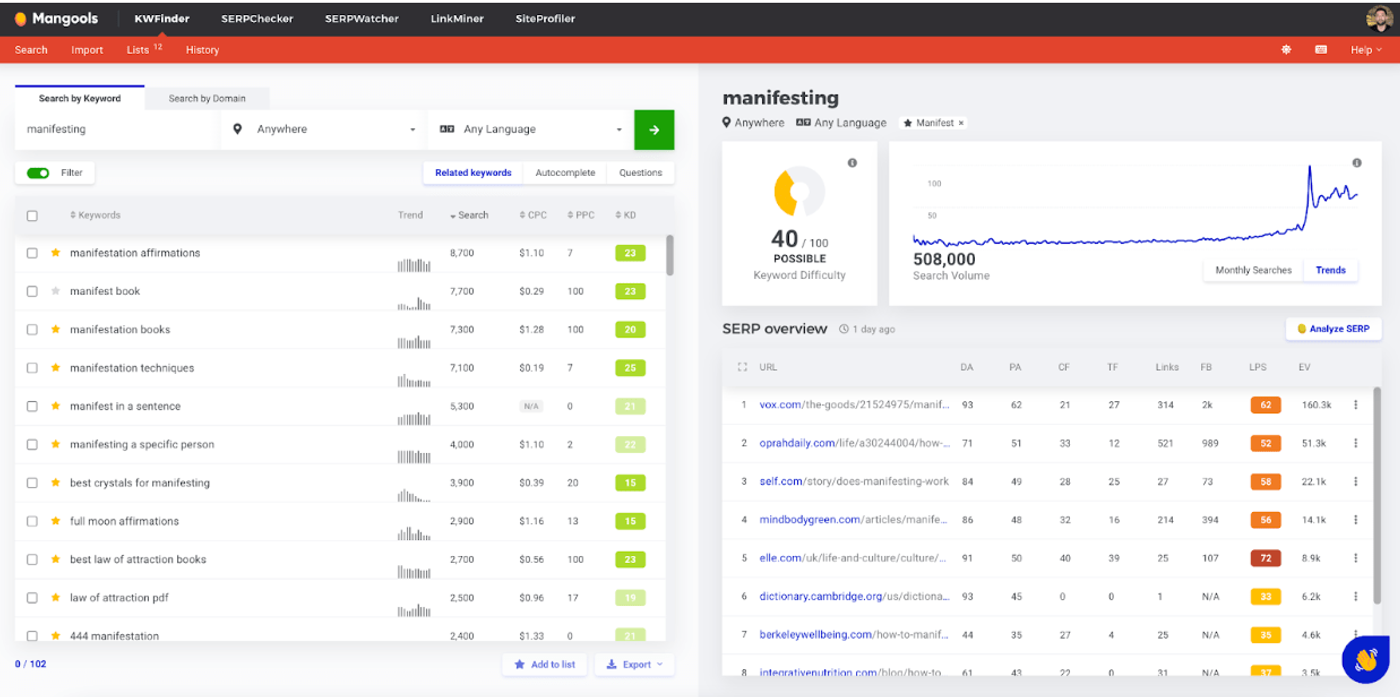
The keyword finder allows you to explore and save keywords in two primary ways:
Via broader keywords: You’re able to enter keywords as broad as “manifesting” and it will provide a list of all the related keywords. You have the option to use the “autocomplete” or “questions” related to the keyword.
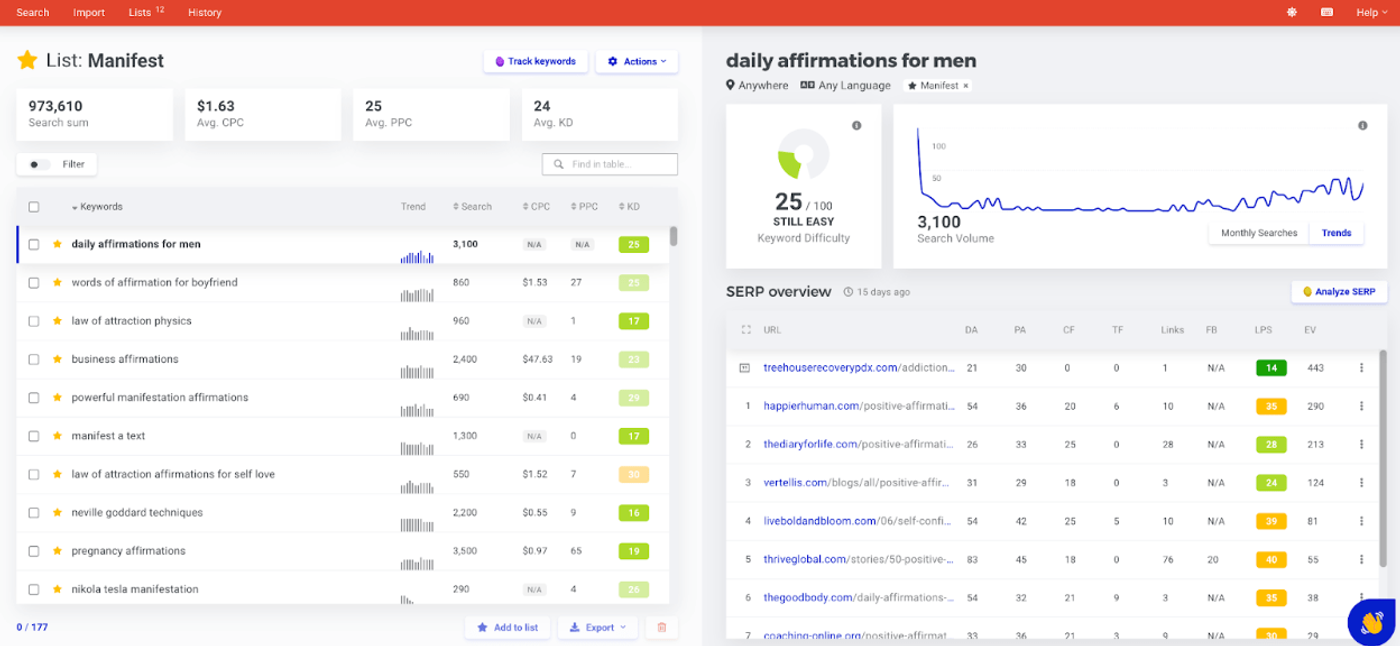
You can easily create unlimited keyword lists of up to 10,000 keywords. I’ve been doing this for a bunch of different niches.
Here’s a list I created for the manifesting niche.
Via domain: Simply plug in the domain you want to analyze and Mangools will produce a list of all the keywords the site ranks for.
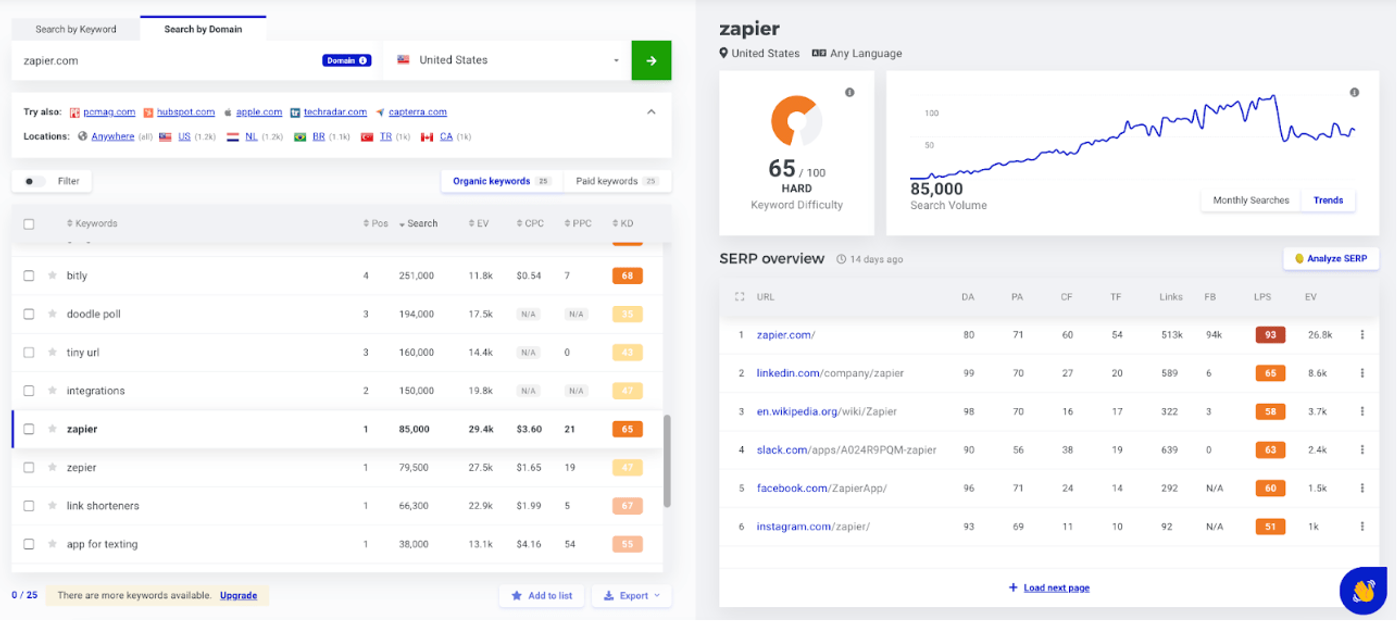
Both keyword finder methods allow granular searches by language and location. The tool also visually displays the search volume over time and Google Trends data.
2. SERP Checker
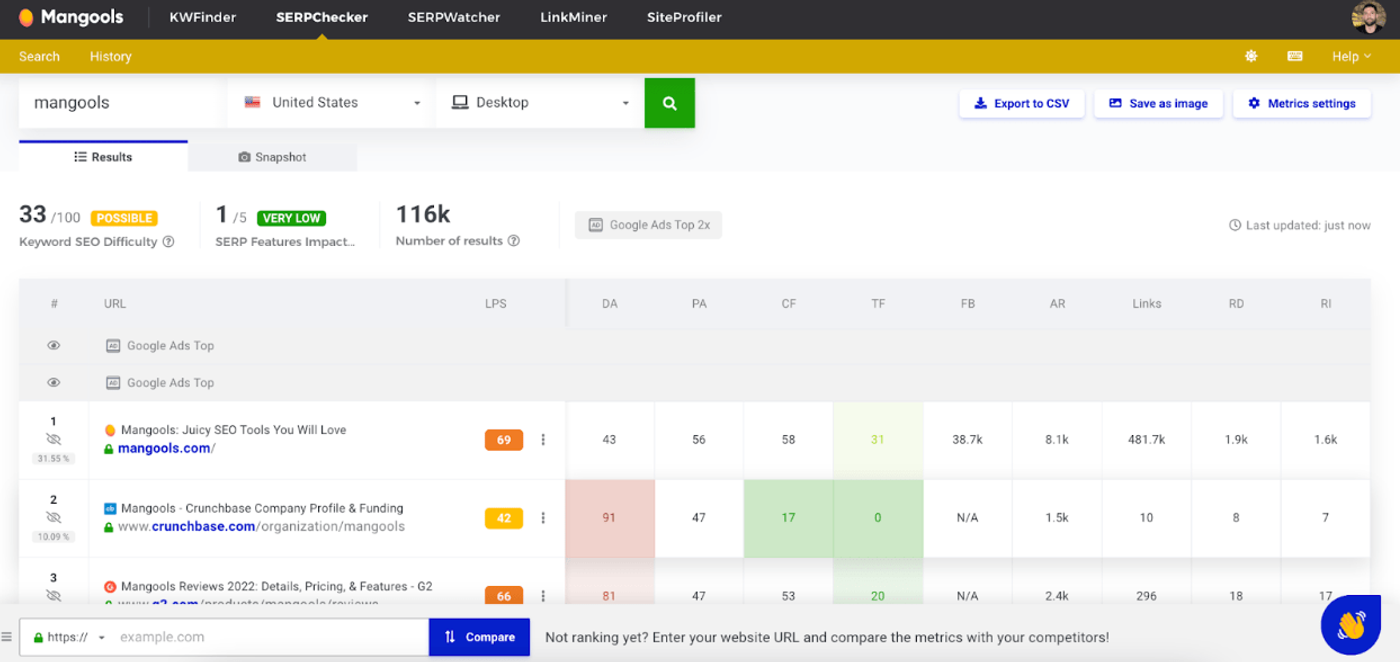
The SERP checker is a more visual representation of what you can see on the right-hand side of the keyword finder (SERP overview).
It allows you to plug in a URL and compare the SERP statistics with other domains.
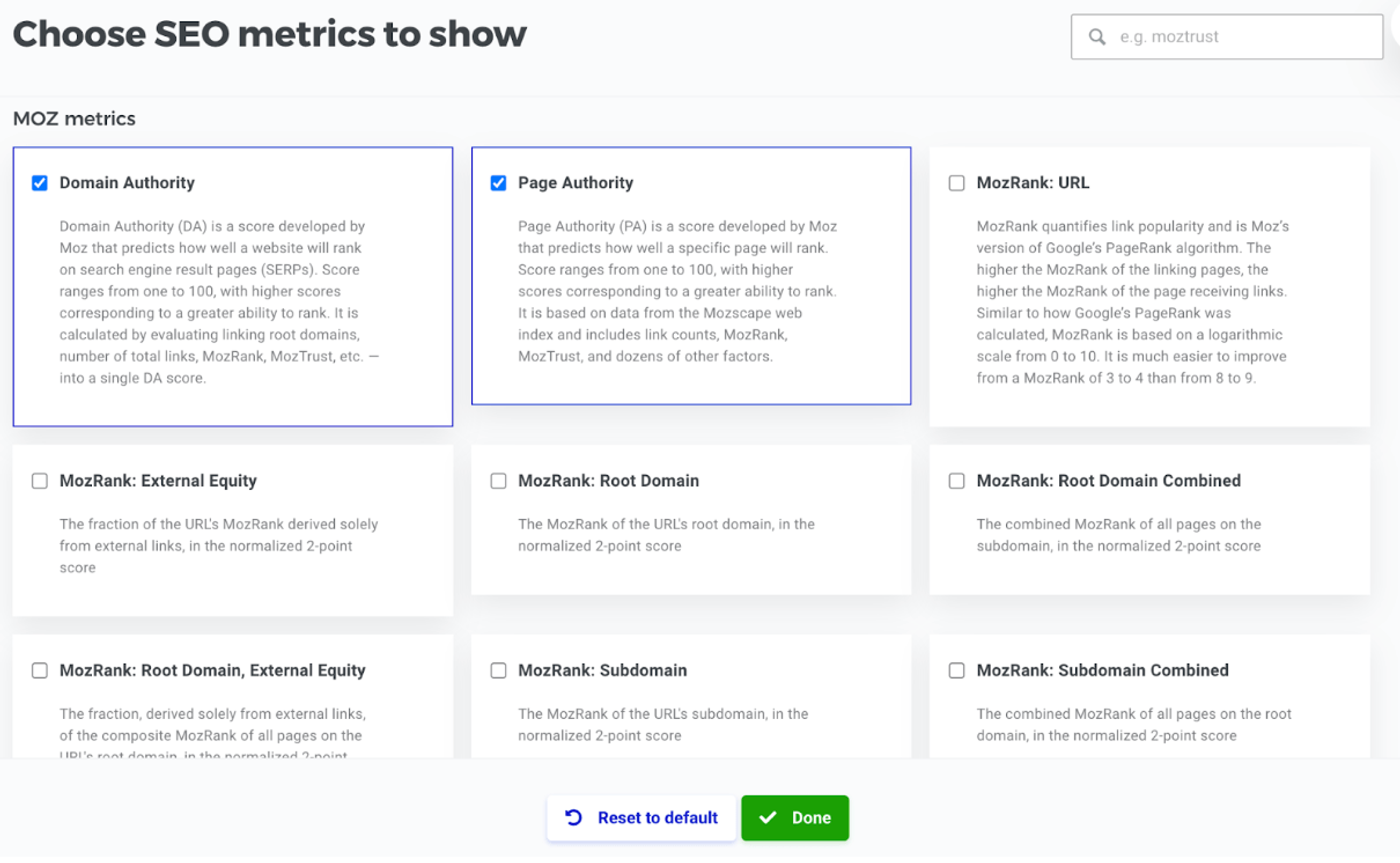
The ability to choose an SEO metric to display is a key feature that makes this a great tool.
3. SERP Watcher
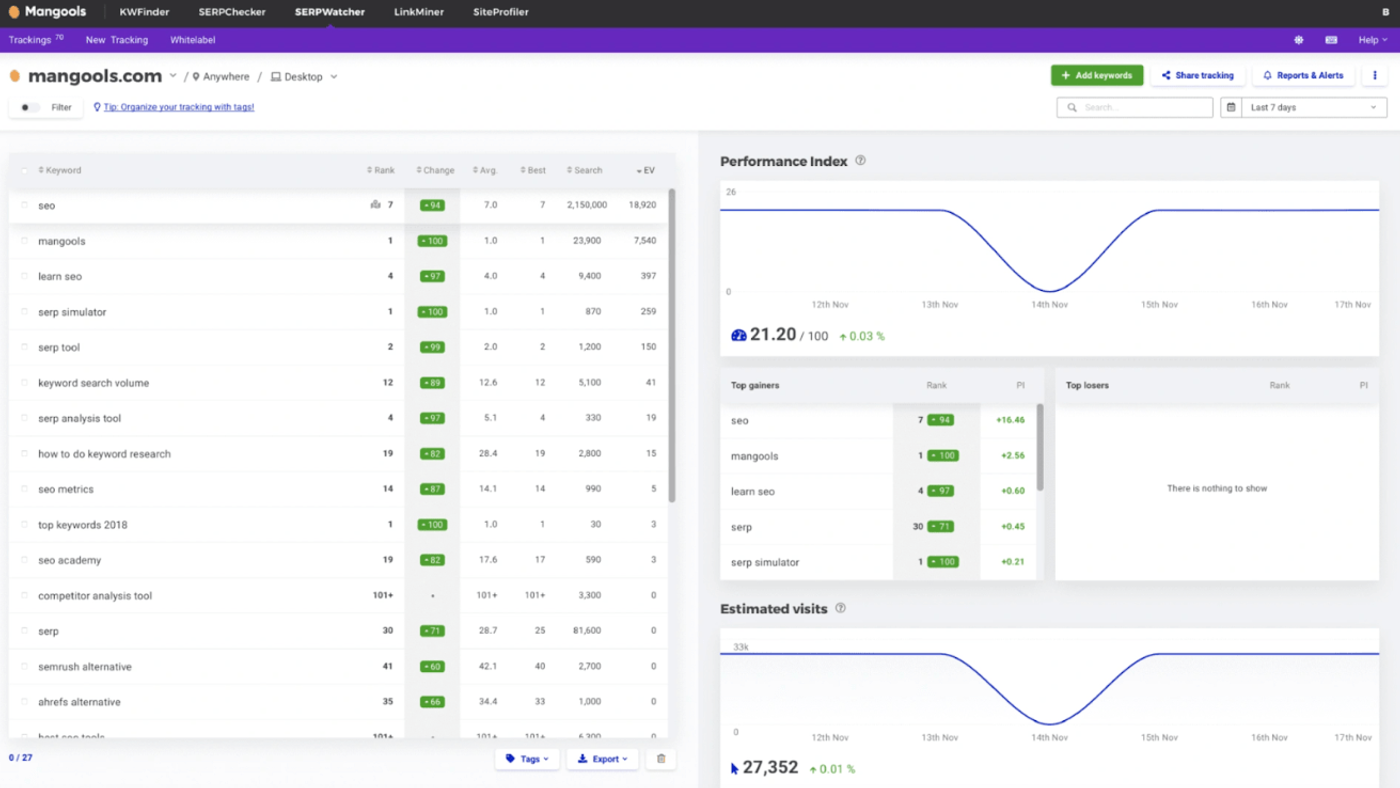
The SERP Watcher allows you to track your keyword performance in the SERPS.
The ideal way to use this would be to create a list of all the keywords you rank for & intend to rank for. Load the list into the tool and simply connect it with your domain. This way your keywords are being tracked 24/7. You’ll know which rankings are increasing or decreasing.
If you’re into spying on your competitors you could do the same with their domain.
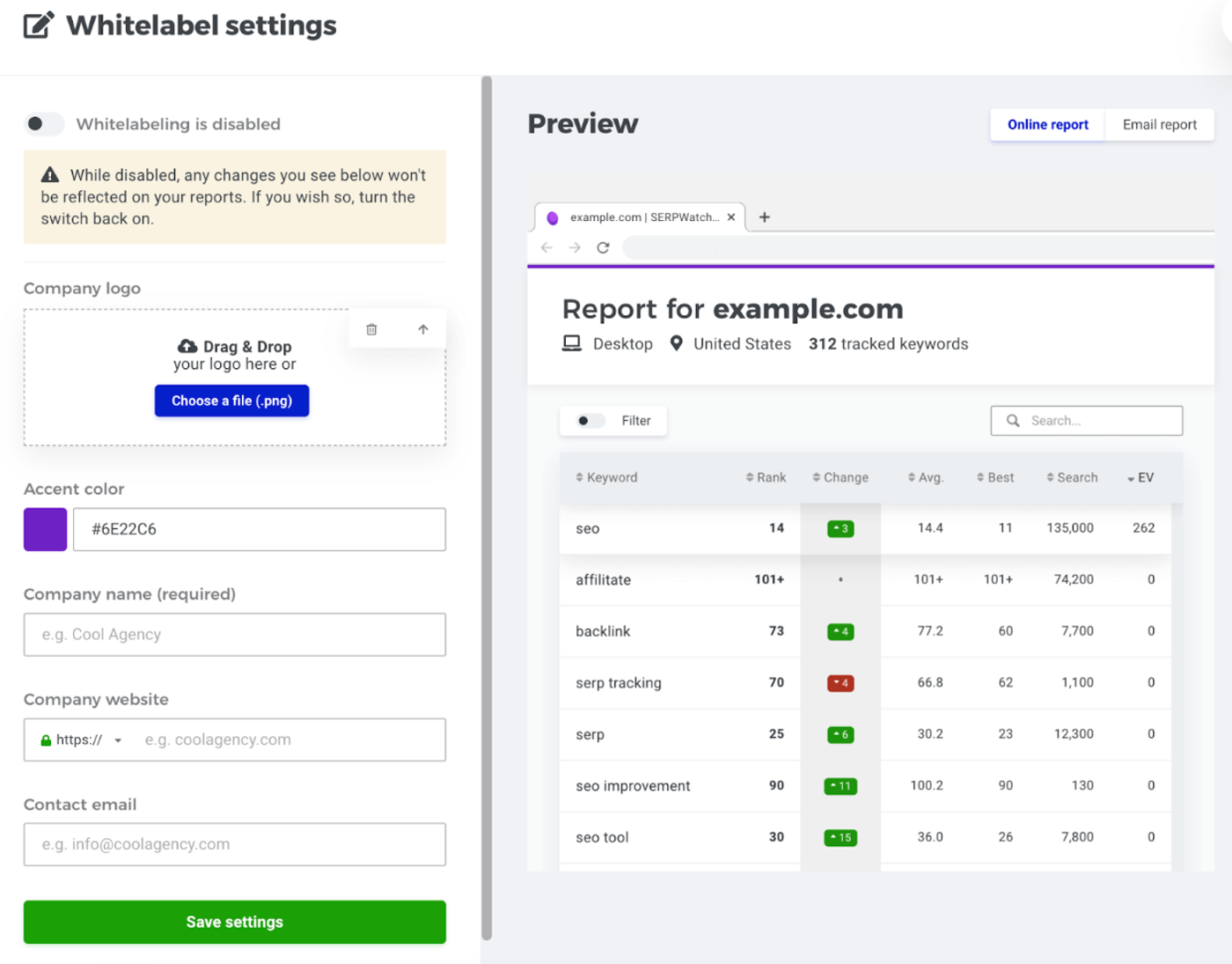
Another feature I can appreciate is the ability to white label reports for clients. So if you run an agency you can still auto-generate reports for the clients.
4. Link Miner
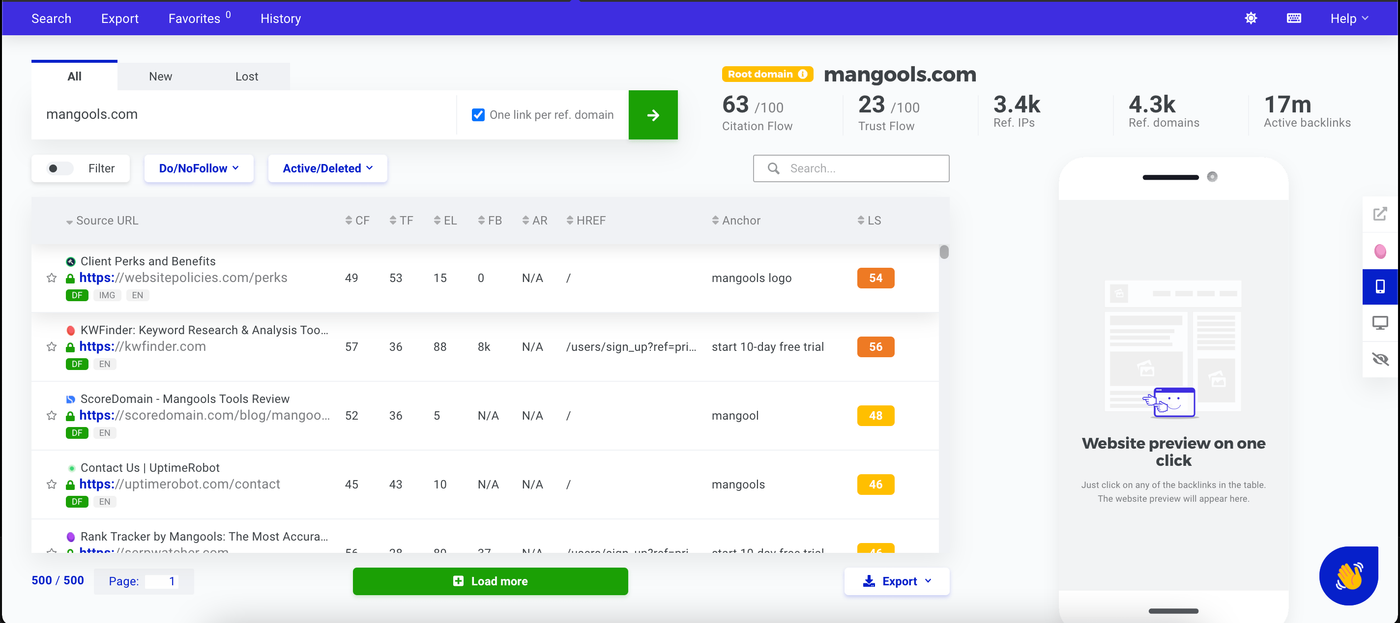
Link Miner is your standard backlink analysis tool. You plug in the domain you’re interested in and you can start analyzing all the backlinks.
This includes new, lost, dofollow, nofollow, social links, etc.
The UI is fairly flexible. You can configure the window to show a preview of the backlinks on desktop or mobile.
5. Site Profiler
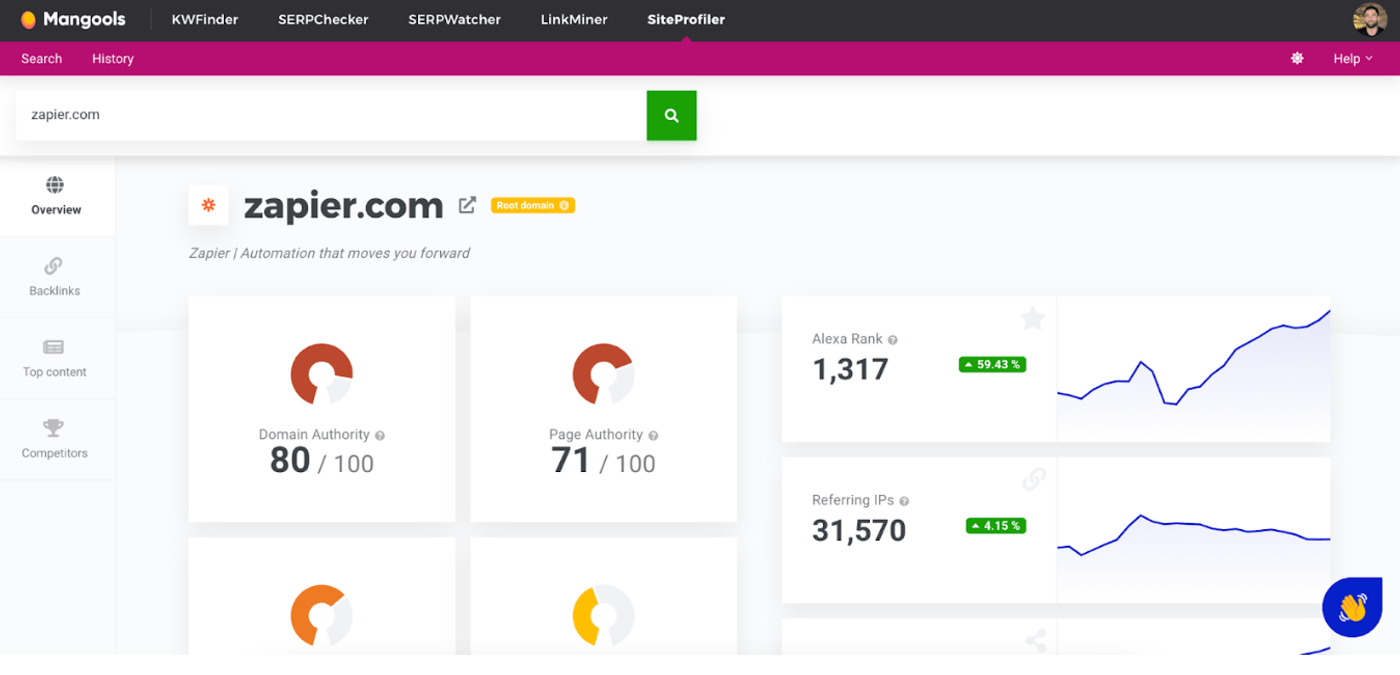
The site profiler tool is perfect for quick competitor analysis.
You plug in the domain and you can easily see all their top metrics. This includes their backlink profile, top-ranking content, and competitor domains.
An interesting feature I didn’t expect to see was “Top Content by Facebook Shares”. It makes sense though, since social shares are a decent proxy for which content actually resonates with readers.
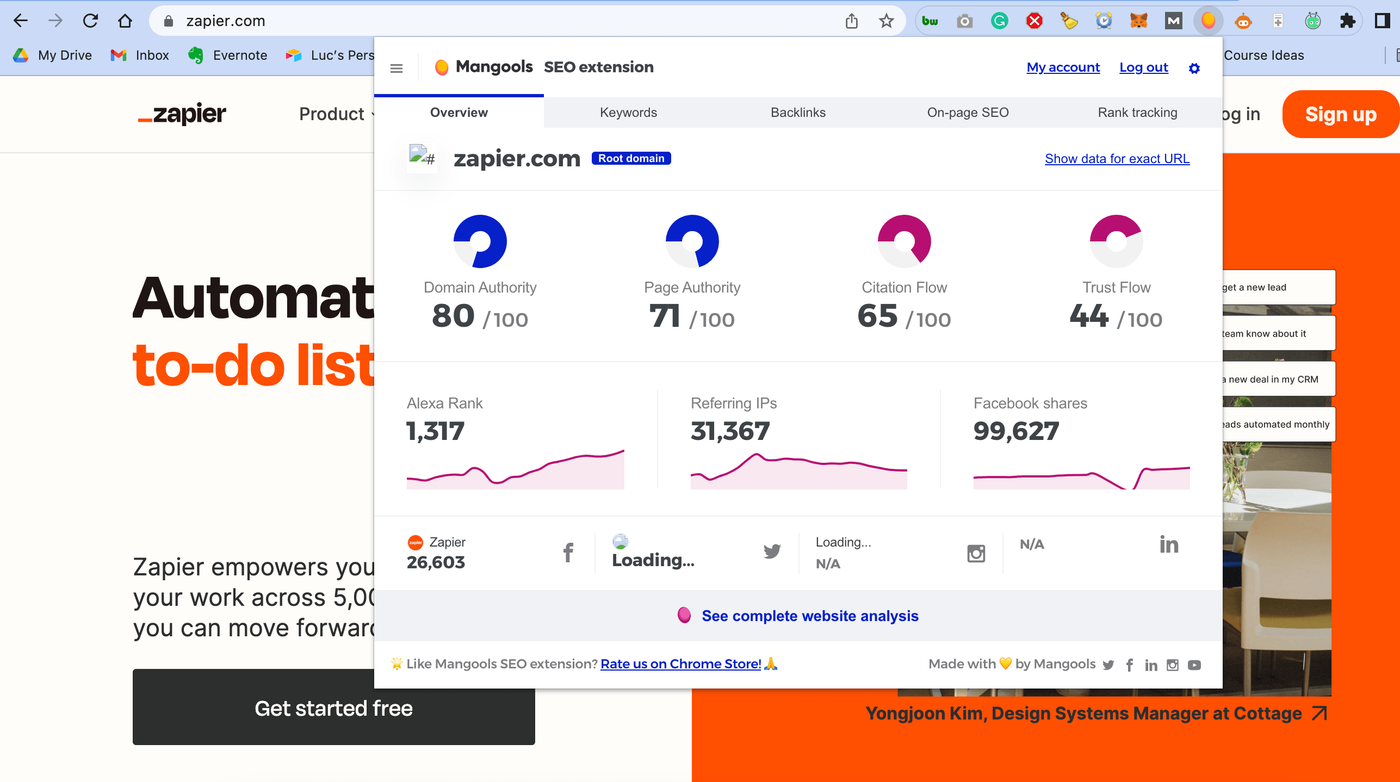
6. Mangools Chrome extension
My go-to Chrome extension has typically been the MozBar. Although it’s somewhat limited.
Since I have an account with Mangools I’ve decided to start using their Chrome extension.
This is the second-best feature behind the Keyword Finder. Mangools nailed this.
Below are the steps I typically take when analyzing a competitor’s site (before using Mangools properly):
- Discover a new site I want to analyze
- Paste the URL into Ahrefs backlink checker
- Paste the URL into the keyword finder in Mangools
- Save some of the keywords and the URL in a new Google Sheet
- Come back to it later (which means never)
With the Mangools Chrome extension, all I need to do is click the icon in the Chrome header and I can do everything within Mangools. All of the analysis is saved into the Mangools app so there's no need to navigate away from my research.
Mangools pricing
Mangools is one of the cheaper SEO tools on the market. In fact, it might be the cheapest full SEO suite you can buy.
There is a permanent Free plan, a 10-day free trial, and three paid tiers. All three include the same five apps; the difference is purely in usage limits.
- Basic: $49/mo ($29.90/mo billed annually). Best for solo bloggers and freelancers.
- Premium: $69/mo ($44.90/mo billed annually). Best for established bloggers and small teams, with up to 3 seats.
- Agency: $129/mo ($89.90/mo billed annually). Best for agencies, with up to 10 seats.
Here is how the entry-level price stacks up against the bigger tools.
| Tool | Entry plan (monthly) | Entry plan (annual) |
| Mangools | $49 | $29.90 |
| Ahrefs | $129 | $108 |
| Semrush | $139 | $117.33 |
Prices in USD, checked September 2026. Ahrefs and Semrush entry plans include one seat and a much broader feature set, but they cost roughly three times as much as Mangools Basic.
The pricing is justified since the product suite isn’t as large or capable as the other tools. However, this shouldn’t deter you. Most users won’t need more than five key tools to get their analysis done.
How I personally use Mangools
I personally use Mangools for two core reasons.
To grow my own site: I use Mangools to navigate the growth of this site. I started with zero traffic and keywords, and I now rank for valuable keywords identified using the Keyword Finder. I go deeper into how I've leveraged Mangools to land copywriting clients in the article: How to find copywriting clients fast.
Identify new niches to explore: Mangools has sent me down many rabbit holes. One of the examples I used above is Manifesting. I discovered ✨ manifesting ✨ and ✨ affirmation ✨ keywords through Mangools and eventually uncovered a cluster of keywords that have over a million monthly searches, with a genuine chance of ranking.
Here’s what I wouldn’t use Mangools for:
- Running an SEO or content marketing agency
- Managing a portfolio of sites that bring in more than 500,000 visitors a month
- Very technical SEO analysis
One feature I don’t like
There’s only one feature that I find inconvenient, which is actually pretty good for a tool like this.
When I use the Keyword Finder app, the keyword difficulty sometimes updates when I click it. This could be a caching issue.
For example, the keyword “manifesting meaning” initially loaded on “26” but when I click on it the number refreshed.
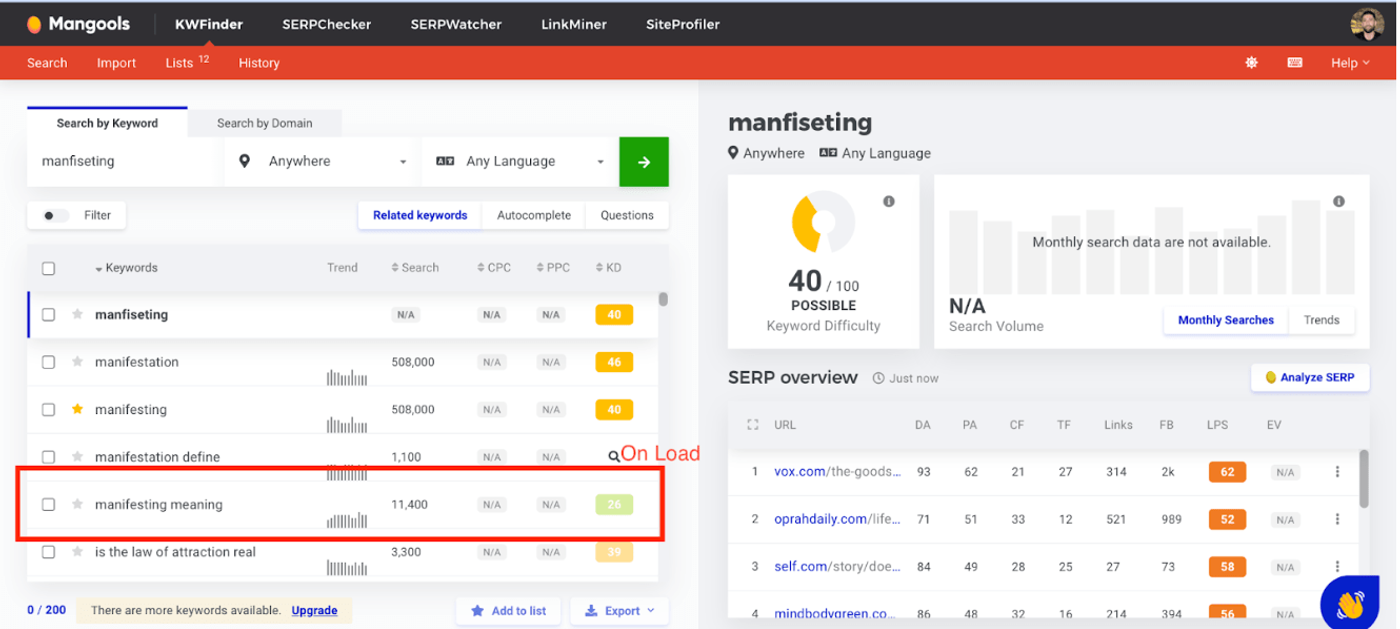
In this case, it refreshed from 26 to 36. This means the keyword is harder than I initially thought. Either way, it’s sometimes inaccurate until you refresh the data.
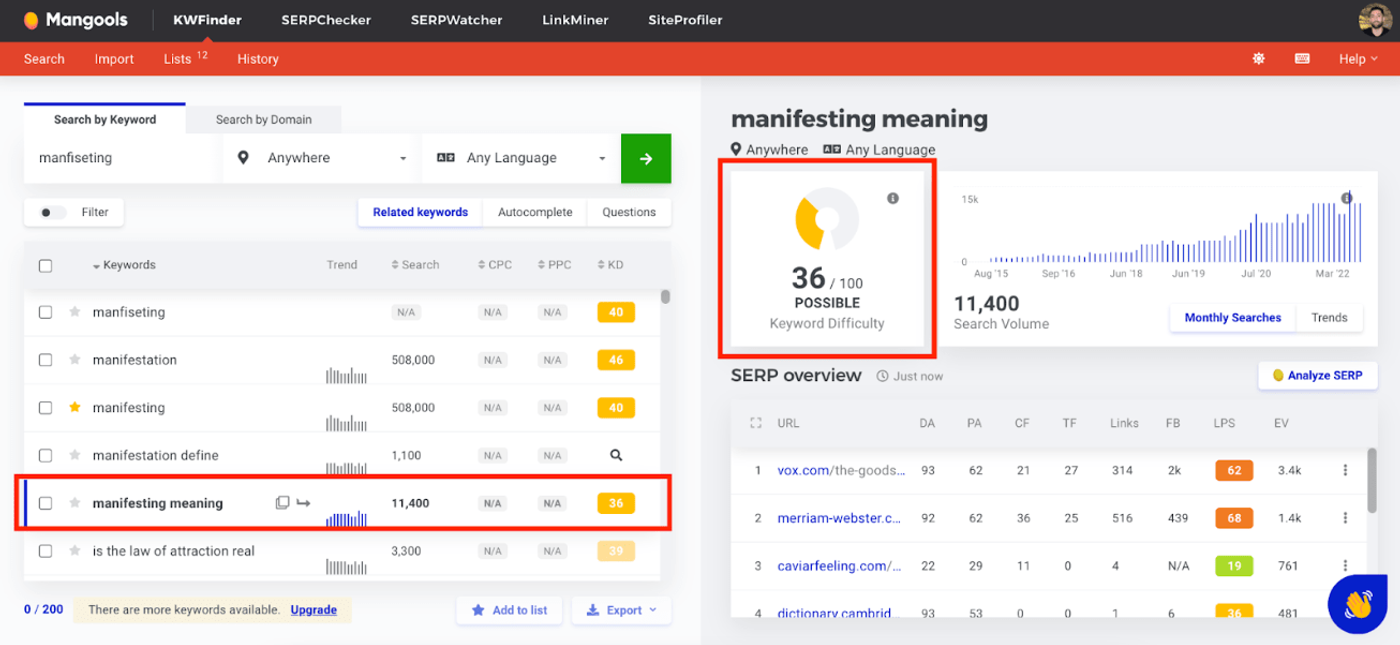
It hasn’t been enough to turn me off the tool since the pros outweigh the cons. But it can be a little annoying when you think the keyword difficulty of a term is low and it turns out to be much higher.
The ideal Mangools user
In my experience, more isn’t always better.
Some of the larger research tools offer white-label reports, special alerts, social analytics, audits, content comparing tools, and loads more. I don’t think all of these are absolutely necessary.
It doesn't make sense to pay a premium for a tool with loads of features if you only need the core SEO features.
I think these types of users would get the most value from Mangools:
- The average blogger who needs an SEO tool to guide them but doesn't want to get lost in the research
- Someone who is cost-conscious
- SEOs exploring new niches to target
Final thoughts
One-sentence summary: Mangools is the most underrated SEO tool with an impressive keyword research app and easy-to-navigate user interface.
Mangools is one of the less popular yet highly underrated SEO tools. However, it’s the best SEO tool I’ve come across for keyword research and tracking. I’ve uncovered loads of niches to target and I’ve even hit the #1 search result for multiple keywords I discovered using the tool. I like the fact I can do all my research within the app and not have to continually export keywords. I can filter everything within the app. The Chrome extension makes this more convenient since I can add a domain or keyword to my list as I find them.
If you own an agency, a portfolio of sites with very high traffic, or you’re a technical SEO guru who leans into technical research, this tool might not be for you.
Since I’m a visual learner I find immense value in the user interface. The color scheme, graphs, and dashboard view are perfect for me. The price is also very cheap compared to the alternatives.
Their pricing increases turned me off them a little bit. The main reason I wanted to use them was their price. Regardless of all the features and functionality, the pricing increase has turned me off using them. They're not as compelling as they used to be.
Frequently asked questions
Is Mangools worth the money?
For keyword research and rank tracking, yes. The Basic plan is $49/mo ($29.90/mo billed annually), which is roughly a third of the entry price for Ahrefs or Semrush. If you only need the five core apps and do not run a large agency, Mangools covers the essentials for a fraction of the cost.
Is Mangools good for keyword research?
Keyword Finder is the strongest part of the suite. It surfaces related keywords, autocomplete suggestions, and questions, with search volume and keyword difficulty for each. It is the app I use most.
How does Mangools compare to Ahrefs?
Ahrefs is more powerful for backlink analysis and technical SEO, and its data is broader. Mangools is simpler, cheaper, and much easier to learn. If you are a solo blogger or freelancer focused on keyword research and tracking, Mangools is usually the better fit on price. If you need deep link index data and site audits, Ahrefs wins.
Does Mangools have a free trial?
Yes. There is a permanent Free plan with low limits, plus a 10-day free trial that lifts those limits so you can test the paid features before committing.
Keep reading